
If your LG ThinQ washer-dryer is driving you mad with its constant beeping, there’s a way to shut it up. After a while, the sound that the machine emits during each step of the wash/dry process might drive you crazy.
Fortunately, there’s no need to unplug the appliance. There is plenty of buttons on the control panel… Just figure out which one to press.
How to Unmute Your Washer

Hold down the Dry key and the Rinse+ key simultaneously. Continue to hold them down until something happens. Within seconds, you’ll see the digital display show a mute symbol. The appearance of this icon shows your washer is indeed quiet.

It turns off instantly, and the machine keeps working just like it was before, but now it’s silent. There are no more annoying beeps and tones which means a quiet laundry room. You don’t have to fear waking someone up when washer finishes its cycle.
You’ll see the mute icon appear on your screen while the machine is running, so you know it’s muted for all of the wash cycle.
If you wish to hear feedback and alerts you can enable that by turning the sound back on. To do this, reverse the process using the same key combo. Press the Rinse+ and Dry keys simultaneously again. Wait for symbol to clear from screen. The icon clears very fast and the machine are back to regular volume.
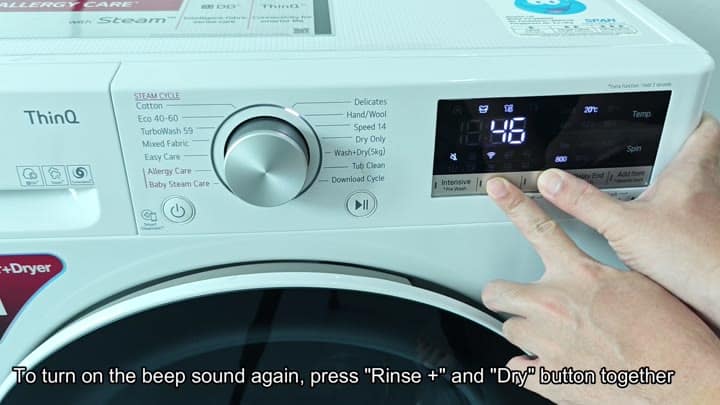
When you operate it, of course it makes noise. To verify that yes, the beeps has returned, run it on a short cycle.
To mute/unmute the device, simply press the same set of keys. There’s no hidden menu or firmware update required.
To adjust the volume, you’ll still rely on the physical buttons located on the main panel. Depending on what you need, you can choose to either get a bit of feedback or turn everything off completely. It is easy and something you would of do often.
