
You should check the time regularly because batteries can cause it to reset. By pushing a few buttons on the remote, you can set it correctly. But what are those buttons? How do you know? The remote’s manual says little. It wants you to know exact order of button pushes needed.
The first key is the Clock pushbutton. That’s easy to locate on the remote.
Setting the Hour
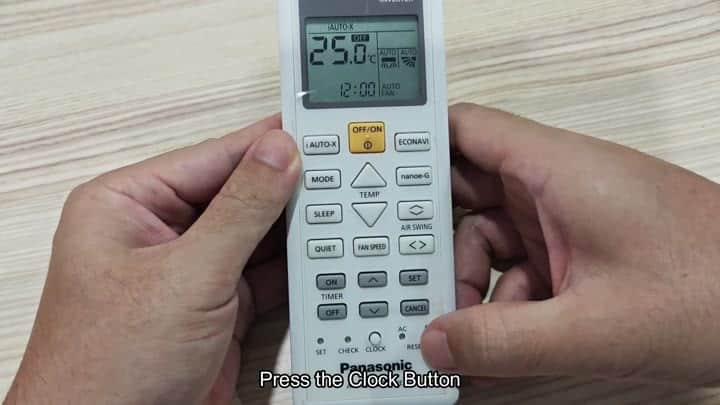
When pressed, it illuminates screen and shows current settings. These might be mode icon or temperature icons. But most importantly… The time. By default, it reads “12:00.” This isn’t ever right. Immediately adjust that so you have the correct reading.
The up and down arrows by the timer controls let you tweak that number. Tap it to nudge in either direction. To adjust the minutes, you has to tap the down arrow key. Each tap of this will lower the minutes on your clock. Monitor the screen closely so you can see if it’s fast enough. Keep tapping those arrows until you reach your desired minute. When I tested it, the time went from 00:13 to 00:03 but showed “12:03” instead.
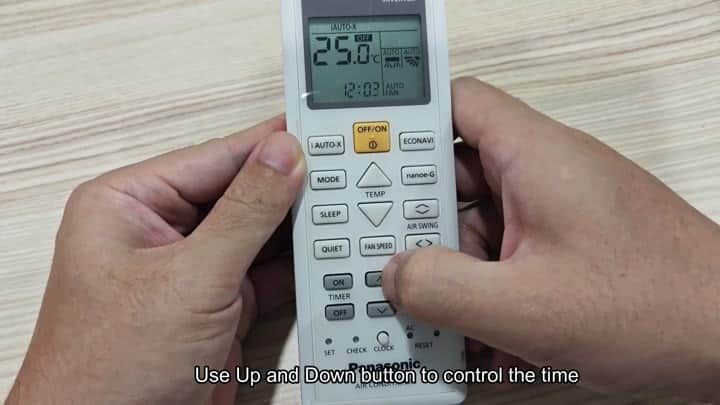
ECONAVI and AUTO-X show through as icons, without distracting. The few second delay can cause scheduling issues for the air conditioner later.
Next, we will tweak the hour.
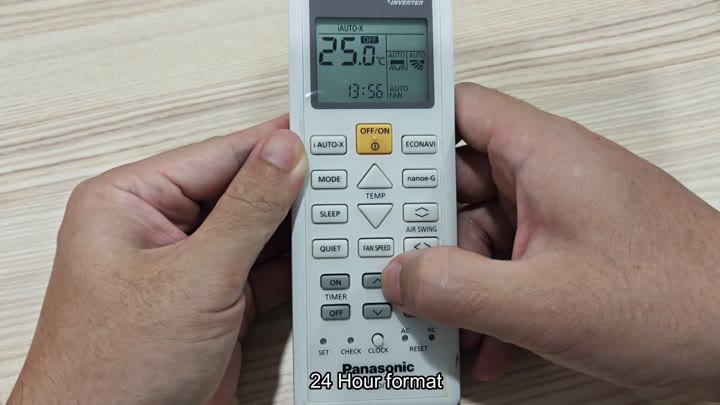
Scroll back down until you see the TIMER section. There’s an upward arrow button located under the TIMER section. That’s the button to use for bumping the hour up one number at a time. Hit it once; the number go up. Cycle your way around the hour. Maybe it says “13:56” on the screen. Okay, so the remote displays times in a 24-hour format.
That makes sense, and eliminates any confusion by using a 24-hour format instead of a 12-hour clock. Check the hour to make sure it match the time of day. And remember: take your time here, counting carefully prevents you from messing anything up.
After you press the SET button, the remote stores the new time. It accepts your input immediately. The clock shows the right time. If your unit has a timer function, now it’ll run on an accurate schedule. Who wants the air conditioner to come on at wrong hour?
Once you learn how to set the time, it’s quick. Because there’s no menu digging around, you don’t even think about it; the process is simple. Plus, since there are physical buttons, it’s also something you can do one-handed.
On the screen you see the time changing right there in front of your eyes. It provides instant feedback that reduces errors. Because the remote responds so well and directly to your control, you enjoy the direct control.
Changing the clock doesn’t take long but makes a difference in what else you’ll be able to do with it. Timers won’t work unless the clock is set correctly. Look at your phone and check the clock setting here; they should be identical. Perfect. With confidence in what you’ve done, your Panasonic remote is up and running. No more worries here and off you go to other settings.
It resets itself from batteries so that’s something you’ll have to be mindful of checking often. That’s one annoying thing about this unit; it’s a fairly typical problem. All you have to do is change out the batteries and set your time again. A small hassle but hey, at least you know it’s accurate. Keep some extra batteries around “just in case.”
The remote itself is very user friendly, buttons are clearly marked and the LCD readout is legible. Good contrast means no issues with seeing what you’re doing. Because you’re going to be interacting with the air conditioner quite a bit, clarity is important. Simple technology is appreciated because that equals less frustration and more time saved.
The process makes sense, and you get it done quickly, in minutes. Clock, adjust, set. Never do anything out of that order. Why? Because it will mess something up. But now you know what to do. Now everything works perfectly.
Setting the clock ensures your unit operates on an accurate schedule. You set it so it knows when to work or not work, saving money over time. You like that it’s customizable. You like having the power to make it fit YOUR comfort.
What you have here isn’t just an on/off switch. It controls the environment. It’s a remote, but a very strong one. And you make full use of it. Every single time. With this model, the steps are never different than before. You know this system will work because it always does.
