
This wasn’t the best way to wake up: One morning my PS4 just booted right into Safe Mode. I don’t like troubleshooting my computer’s hard drive and I certainly didn’t sign up for that when I bought a game console.
It displayed a list of confusing options on the screen. These options included rebuilding the database, changing resolution, or updating its software.
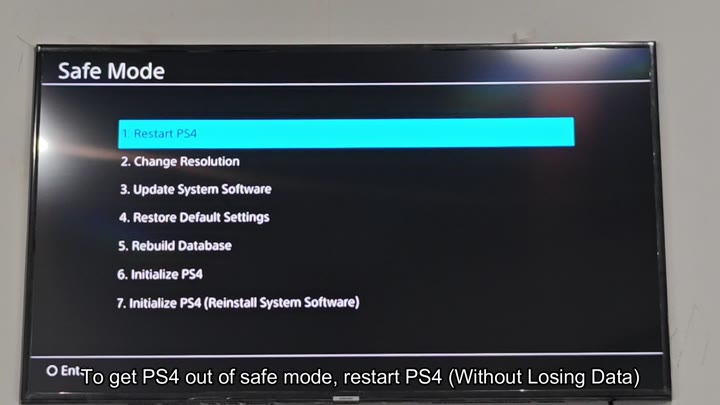
You want to get back to home screen while preserving everything, so you have to be careful because some options can wipes your data. So choose wisely! So choose wisely!
Navigating the Safe Mode Menu
Restart PS4” is the first option on the list and seems like safest bet. Press that button and wait while system reboots itself; nothing on the system gets touched in the process, including saved settings and files.
This usually does the trick, the console reboots and everything returns to normal. Whatever glitch resulted in that Safe Mode entry is gone after a quick reboot; you’ll just have to wait for the loading screen.
But nothing happened. The system simply booted straight back to that menu. It was annoying, time to try something else.
Scroll down the list and eventually you come across “Restore Default Settings.” This is different than initializing the console, which will erase your entire hard drive. This will reset your system’s configurations back to how they were when you bought the console, leaving all of your user data alone. Your installed titles, your profiles, your saved games…everything is safe and sound here, so you highlight the option and choose yes to confirm.
You click on it, wait for the console to process the request and within several minutes, the system resets itself. Will it work? Hold your breath. There’s silence, followed by the sound of PlayStation logo, followed by that familiar hum of drive spinning back up again.
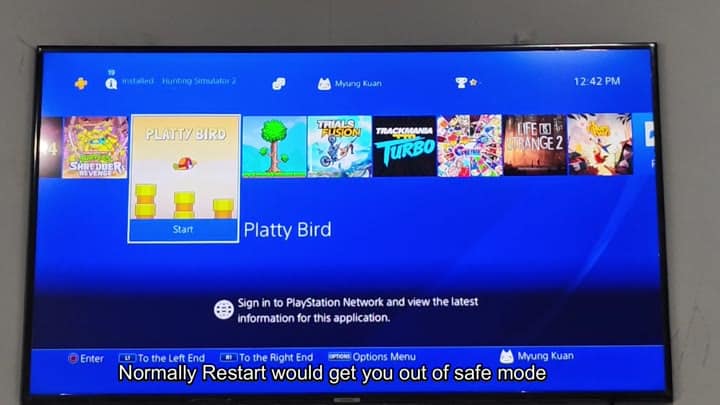
The home screen loads just fine. Your games is all still there; Life is Strange 2, Trials Fusion, Platty Bird…all waiting for you. The time says 12:42 PM. In the corner, it’s your profile (Myung Kuan). Relieved a lot, you managed to get out of Safe Mode without losing anything.
For what it’s worth, there is also an option for “Initialize PS4,” which you shouldn’t ever do if you don’t intend on completely wiping your system. Choosing initialize will delete everything: users, downloads, save files, etc. No going back from here. The warning message is clear enough for you to see, it says it would of erase all data.
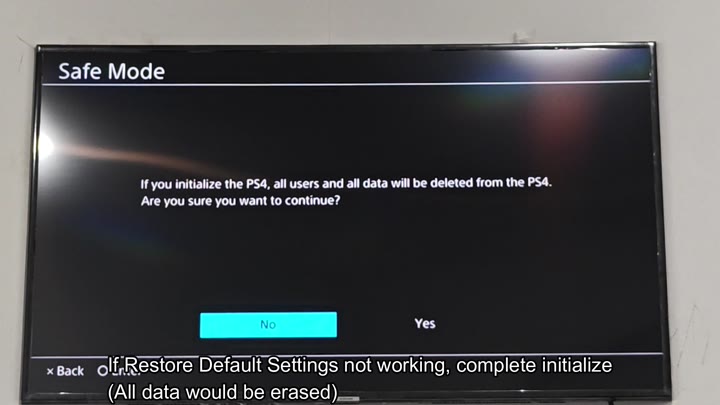
No. You don’t click yes. That would have been disastrous.
So instead of doing that, you follow the safe course: Try one. Try restarting first. It’s easy. It won’t hurt anything. Then if that doesn’t work, try two. You can restore default settings. That’s more aggressive but it shouldn’t damage your data.
A lot of people freak out when they hit safe mode and assume it’s broken past hope of fixing. But usually it’s just a little software hiccup that can be fixed with a restart. So you don’t go straight to initializing.
Instead you just give the system a break, let it reboot, and if it’s just acting funny, you try to give it a chance and let it fix itself. Only when all else fails do you wipe the drive, at which point you’ve already exhausted the non destructive options.
The console has had a chance to fix itself, and in your instance, the restart didn’t work, but the restore settings did. It wasn’t a clean first shot, but it turned out alright in the end.
The menus get you used to patience. Everything matter when you read them. Click one wrong thing and you lose hours of gameplay. Always make sure you know what’s going to happen when you press the button.
Don’t panic if Safe Mode looks scary. That’s not the end. There are choices. Make wise ones, because most things is pretty easy to fix. No technician needed for a boot loop.
Just know which way to go. Remember: Restart first, Restore second, Initialize last. It saves time. It saves data. It saves sanity. Worked great.
