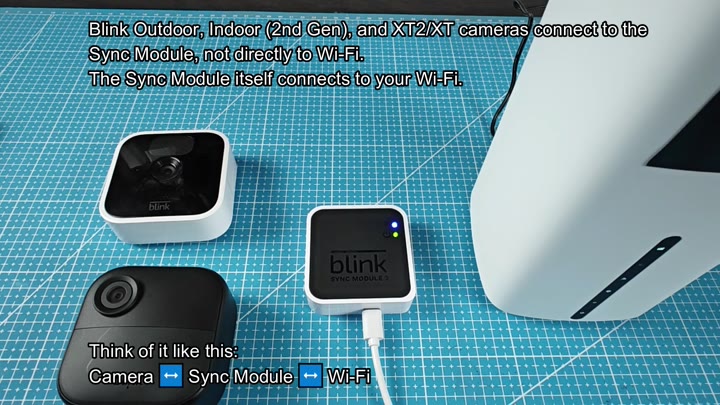
Home security systems can be intimidating to set up. You might have multiple devices, such as various Blink cameras, and not be sure how everything connects to your network. It varies depending on which camera or piece of hardware you’re using. Some are plug-and-play, some require additional equipment. And if you attempt to force something to work when it isn’t supposed to be directly connected, well… you’ll learn that the hard way.
If that’s too much, the Blink Mini is the most straightforward one of all. Just pop it onto your desk and plug it directly into your home Wi-Fi signal. You do not need any additional equipment. It just finds the network by itself. There are no middle devices here. It is plug and play.
That’s not the case with other models though. If you have one of those that connects directly to your router (like the XT, XT2 or Outdoor camera), you may be asking yourself why they’re any more complicated at first. Turns out, they are: These cameras rely on a Sync Module to fill the gap. This is the middle man between these cameras and the internet. First, they’ll pair with this hub, then it will connect them to the internet.
Connecting cameras to the Sync Module
Lay it all out to really see the difference. Next to your cameras is your Sync Module 2. Take a look at the module. See those LED lights? They’re lit up. The green and blue one means the device is up and running. That’s your hub to make the rest of your cameras work. Without the hub, your outdoor camera aren’t anything but an expensive brick.
These models has a specific connection flow. Camera connects to the Sync Module. Sync Module connects to Wi-Fi. It is a two-step handshake. Figure it out quick by watching the lights blink in sequence: The camera talks to the hub; the hub talks to the internet.
It won’t accept connection from an XT2 camera without a module initially. It’s true, you’ll try that, then you’ll search for a Wi-Fi button on the camera body… it has no such thing. The camera requires the module for its network access. Plug the module in and it powers up (green light) and connects to the internet (blue light). That is a big difference.
Similarly, your Outdoor camera requires the same arrangement. Pair it with the Sync Module 2 via the app to get it onto your network. Once the module’s active, the pair-up goes smoothly. Your camera doesn’t connect directly to your Wi-Fi. Instead, everything passes through the module.
That’s a smart trade-off in terms of battery life, since direct Wi-Fi links will sap power more quickly. The module does the heavy lifting.
Look at it side by side with the XT2 setup and see how they compare. They both record video just fine. The Mini is standalone while the XT2 is dependent. One has a bridge in there, one doesn’t. It’s all about the connection path. And that’s what clears everything up so you don’t guess which cable goes where.
The Sync Module allows you to add multiple cameras to a single hub.
On the same note, the Sync Module supports multiple cameras as well. Adding a second camera to the same hub does work without any issues. Both devices will be handled by the module itself. From your Wi-Fi router perspective, there’s just a single new device. That helps reduce network clutter as you don’t have to mess with too many IP addresses. It is an easy fix.
All in all, knowing who does what with their cameras saves you time. You’re not wasting hours trying to troubleshoot your Mini, thinking it requires a module. And you’re not attempting to run your XT straight to the router. Knowing what hardware you need at setup time prevents frustration later on. Your system is up and running. Motion detection are working. Cameras are recording.
It’s important to understand the difference between a module connection vs a direct Wi-Fi connection. That will determine your configuration of Blink products. Before getting started, confirm your model number. Know which equipment is in place. This article will help you figure that out. And setup goes smoothly.
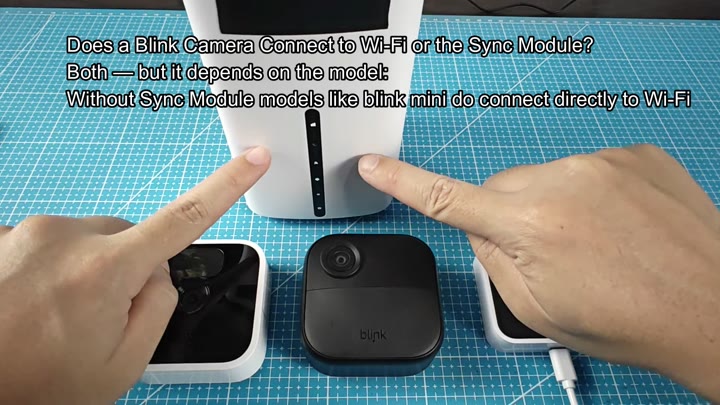
It’s small. And not obtrusive at all, as you put it right beside the module in your test setup. It is for comparison. It stands out how much smaller the camera actualy is. It’s sleek and minimal. The module is bigger and more substantial with its indicators and ports.
Maybe you prefer them both.
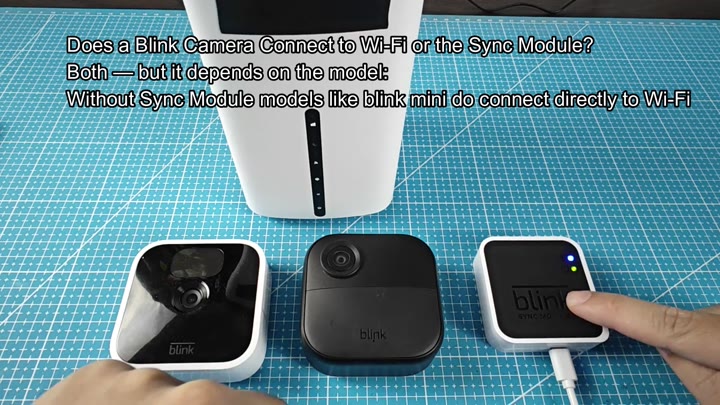
To pair a camera with this module, you just have to feel around until you find the pairing button on the Sync Module 2. It’s solid. Push it. And the lights will blink for a second or two, showing that the module has recieved your request and is now awake. Now you’re paired and know the module is waiting for another camera to come online.
You press the button to initiate the connection process.
It is also reassuring.
And there it sits. Finished. Paired cameras, active and ready. Powering the module via USB cord. Green and Blue LED’s staying on. No errant code flashing, no flickering. Just solid. You like how it turned out. All is good. The system is stable. Done.