
Look for the Smart Diagnosis icon on control panel. Without this symbol, the built-in tool won’t be enabled. This little icon will tell you if there’s a problem with your water supply or the door itself (which is handy to know quickly).
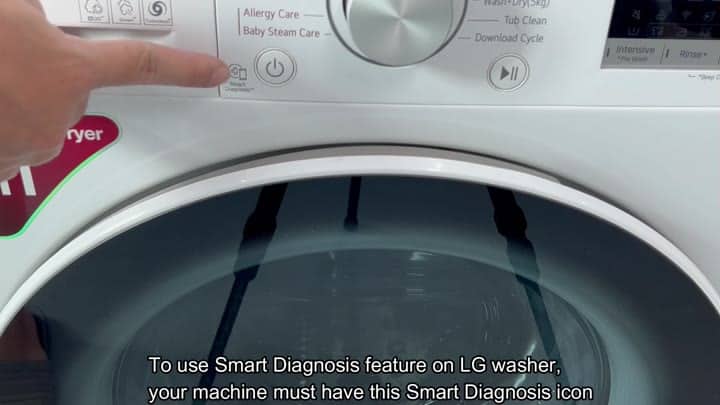
This one is for those who do not want to have a technician on speed-dial. You can detects temperature sensor or other motor problems remotely at home), troubleshoot issues, and fix any error that might be occuring before you even call someone.
Running the Diagnostic Test
If you’re wondering where to begin, this makes it pretty simple and quicker then just throwing darts at the wall hoping to figure out problem with your appliance.

First, go into your phone’s app store and download the LG ThinQ app. Once it is installed, open the app and go to main menu where you should see an option for Smart Diagnosis. Tap on that, which will started the diagnostic process right away.
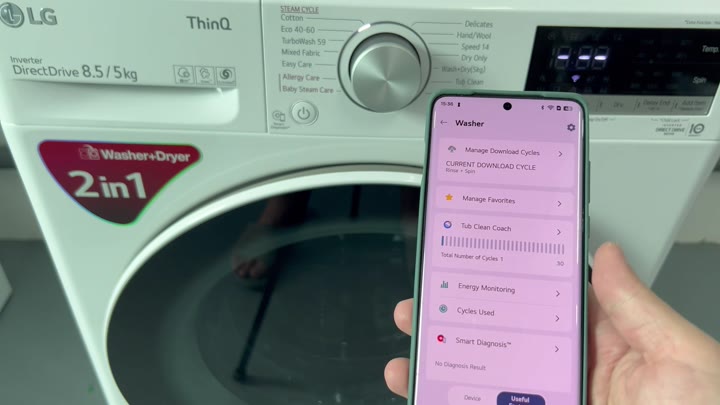
Then you place your smartphone right up against the Smart Diagnosis terminal on the appliance. This connects the washer-dryer to mobile app to send the device’s data. Just hold phone still while it transfers the information. Do not interrupt the process.
All of the relevant info gets collected by the system.
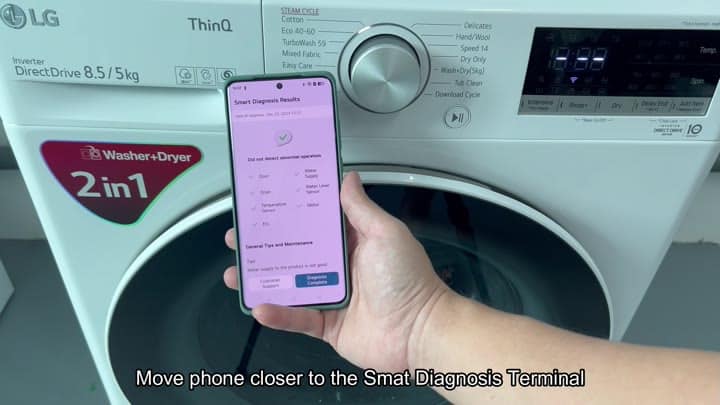
After the data transfer, you get to review report that it generates on-screen. It flags any abnormalities with water-level sensor, door mechanism, etc., and also scans the water supply line and drain system for any leaks or other blockages.
Thankfully, nothing abnormal was reported for the motor or drum of my particular model, that should of clear up a bit more of what’s going on here.
For example, you’ll have a very clear idea of how all of its components is faring, which ones are in good shape and which should probably be on your radar.
