
Resetting your PS4’s network configurations is simple. That’s just a small set of settings. It doesn’t require a full factory reset, which would delete your saved games and everything else on there.
It’s the kind of behind-the-scenes stuff that should clear out pesky connectivity problems but doesn’t mess up your progress. It’s a maintenance job.
Accessing the Initialization Menu
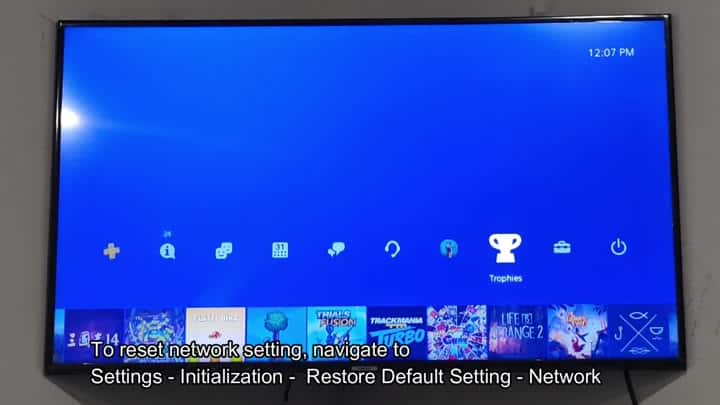
This brings us back to main home screen. There’s a lot of icons here but they’re laid out in an organized manner that makes sense. Game tiles sits alongside system functions and the interface itself is well designed.
From left to right on this row, you’ll see icons for messages and trophies before finally stumbling upon settings menu at the very end. If you weren’t trying to locate the settings menu, there’s a good chance you’d never even notice it.

Hit select again and there’s a massive list of items such as sound and video outputs. Scroll all the way down till you see initialization area.
The scary-looking part handles deep system resets, but it’s different from initializing hard drive which wipes everything. It sounds menacing but really isn’t that bad. Choose the option to reset back to defaults.
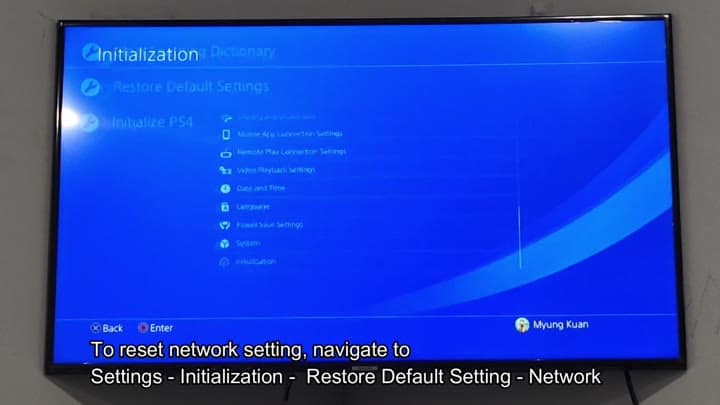
It brings up a menu of options. Restore everything? Or just certain things? Just pick what you want to restore.
For example, network settings is just the connectivity settings. Your game save data and such remain untouched. And that’s the whole point: No lost data. It clears out IP configs, Wi-Fi passwords, etc., but it’s easy.
Next, it prompts you to enter a passcode. That’s in case someone accidentally resets it. Typically the default code is 0000. On the keypad, you type in those numbers; on screen, it displays them as asterisks to hide your entry from people nearby. Confirm.
And it’s a quick fix.
It’s all over in a flash. There’s no reboot of the console. No reboot at all, really. It simply wipes out the data.
Now you’re sitting on the menu screen again. And your network settings have been erased. Time to plug in an Ethernet cable or reconnect to Wi-Fi. It is a fresh slate. After this, the problems with your connection was resolved. Re-type in your Wi-Fi information, and there you go: it’s working perfectly.
This resets it in a better manner then simply turning your router off/on again. It makes the console connect with the network again.
Occasionally your DNS settings get stale, or data you’ve stored can get corrupted. The reset clears this up. It is a quick fix. Don’t be afraid of the init menu, as it serves a purpose. If your update fails to download, this is the way to go. It saves time.
Saving passwords? Yeah, that’s an inconvenience, right? Not really. People generally know their WiFi password and write it down somewhere (or save it in their phone). Ten seconds and you’re back in business. It is worth it for peace of mind.
A fresh start helps performance. Resetting your system might eliminate some dropouts. Even if it isn’t apparent, it will help.
That’s not the same as wiping your PS4 hard drive clean. Wiping your PS4 hard drive will wipe all of your saves, games, etc., and it will reset all your stuff. This isn’t that.
Restoring default settings is a surgical procedure. Only what you choose to select will be touched. Network is simply one slice. Other things can be restored, though most commonly network is the one people go for. Stick to that.
Once you learn the interface, it’s intuitive. The text is white on a blue background. Settings are shown by an easily-remembered suitcase icon. It looks like a tool kit or a briefcase. Either way, you remember it. It is easy to locate.
Troubleshooting tip: Keeps the system running smooth
It’s low effort and high reward if you’re stuck on that pesky connection error. It never fails. But you should of given it a shot so hey, why not? PS4 feels faster. Placebo maybe, but it helps.
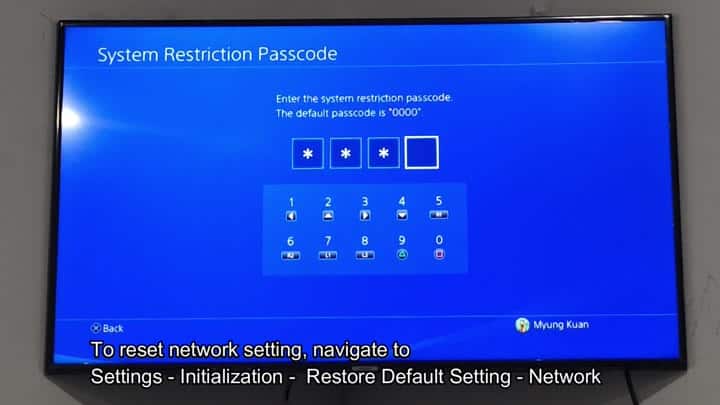
And then there’s the passcode screen. Enter your custom code (if you changed it) or 0000. And then again, yes. Done. Everything is reset. Time for you to get back online. It is that easy. No reboot required. Just configure and go.
Yes, again. You have done this multiple times. There’s always an option. And resetting will take care of it. Resetting is good. That’s why you do it.
Reset only what you need. Clearing your network settings won’t hurt anything. Some other settings might mess up your game. Watch out for those. For network? Go for it. It’ll be fine.
You have a good experience with this process. It doesn’t cause more problems than it fixes. The steps are the same every single time.
It leaves you with a clean network config. It is ready for you to add something. It is reliable.
When the next time your internet goes out, you’ll look at settings. You won’t immediately assume the provider screwed up. You’ll look at the reset button and try that again. Maybe it will fix it. Last time it did. Sometimes simple solutions work.
